For this week’s blog post, I’ll be reflecting on my experience with Notion.
While playing around with this software I noticed how intuitive it was. Within moments of navigating the website, I found myself being able to locate things like the note-taking and project planning sections. I also thought it was easy to toggle back and forth between documents.
I also found a few YouTube videos that helped me dive into Notion a bit deeper. Here is one of the videos I liked:
Currently, I’m trying to figure out how to manage two different accounts under the same email. Since my email is linked to both my personal and work accounts, I am note sure if my colleagues at work have access to documents I add. I am guessing if I opt for the payment plan, this would resolve this issue.
Personally, I am a fan of the Notes app on my iPhone, and I saw a few similarities between the two. While Notes is great for quick jottings, Notion seems to be much more versatile. It has many more features that would allow me to organizes my thoughts/notes with ease. It feels like it’s a combination of Google Docs and iPhone Notes. At least this is how I would use it.
Another thing I like a lot about Notion is the easily customizable templates. I also like the ability to add images easily to the docs. This process seems to always take me to much time when working on Google Docs.
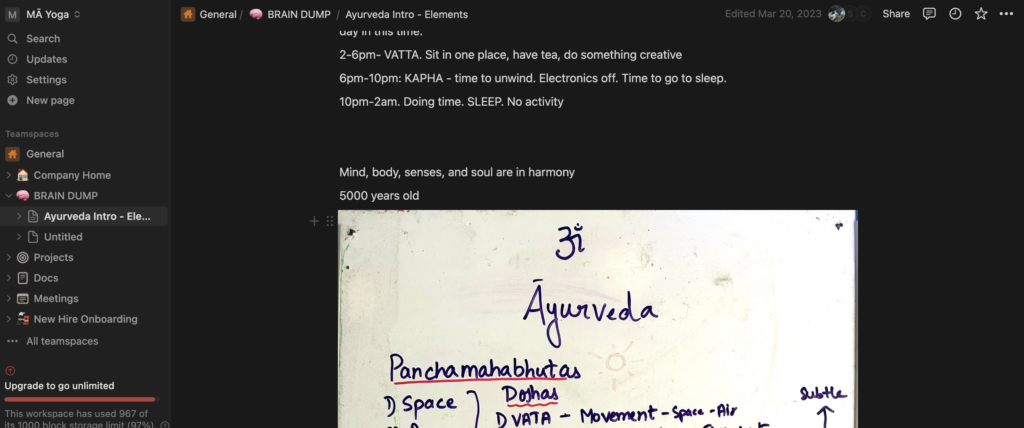
At one of my workplaces, we just began to use Notion as a place to organize our thoughts and communicate to co workers. During the Ayurvedic classes, for instance, I found it incredibly convenient to snap pictures of whiteboard notes and simply add them onto the doc. Overall, I could see how useful this would be while being a student. This could be a place where one could store all their class notes and collaborate with classmates.
Here is screenshot of my screen showing how I added an image of the white board into the notes on Ayurveda.
Leave a Reply
You must be logged in to post a comment.